Checks: the list of your work
What it is for: Checks lists everything you ordered: single pages, site audits, labels and checks sent through the API. Here you search, filter, sort and retry.
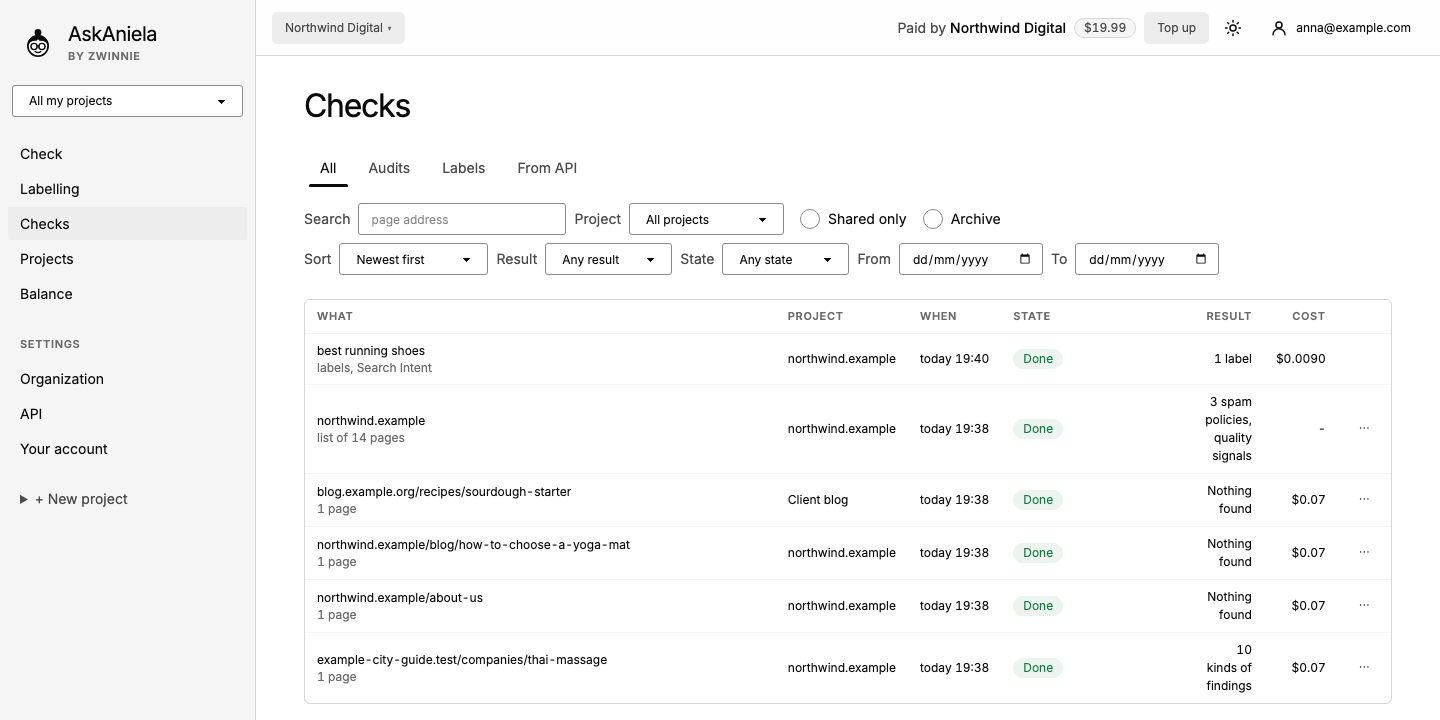
Step by step
- Click Checks in the sidebar.
- Pick a tab: All, Audits, Labels (Search Intent) or From API.
- Narrow the list:
- Search by page address, Project, Shared only, Archive;
- Sort: newest or oldest first, most findings first, highest cost first, address A-Z;
- Result (with findings, nothing found, failed), State (in progress, done, failed), From and To dates.
- Each row shows What, Project, When, State in words, Result and Cost. Click a row to open the report. An audit is one row; open it to see its pages.
- ⋯ at the end of a row: archive or restore, and (owner, admin) delete permanently.
Retrying
A failed row says that the check did not work and that you were not charged. Click Try again - max. $… to run it again; the price is shown before you start. While something is running, the list refreshes by itself.
Common questions
Where are my old Reports, Jobs and Shared pages? They are all in Checks now: jobs under From API, shared items with Shared only.
Why are the pages of an audit not listed separately? To keep the list short. Open the audit row to see them.
Can I bring back an archived check? Yes. Tick Archive, open ⋯ on the row and restore it.