Organization
What it is for: your account belongs to an organization (for example your agency). The organization pays, has members with roles and owns the projects. The Organization page has the tabs Team and Invoices and payments.
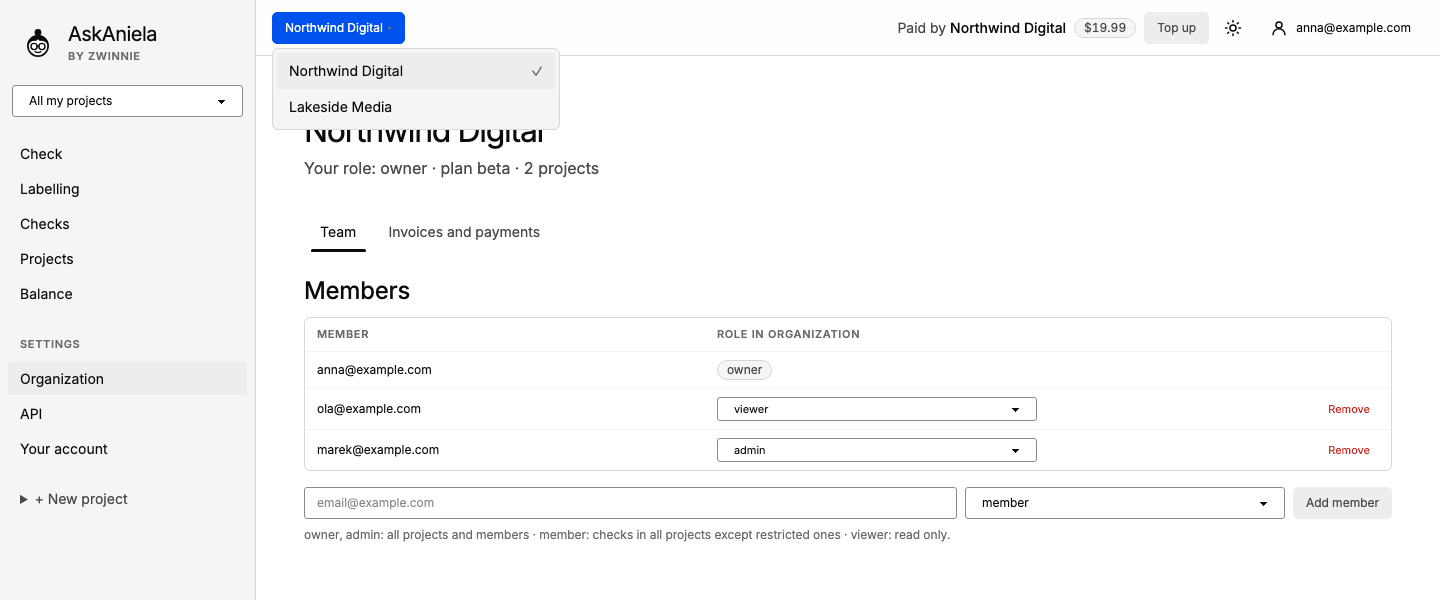
Members and roles
- Click Organization in the sidebar (under Settings).
- In Members change a role in the list or click Remove.
- To add someone, type their e-mail, pick a role and click Add member. The person needs an account first.
| Role | Can do |
|---|---|
| owner, admin | all projects and members |
| member | checks in all projects except restricted ones |
| viewer | read only |
Switching organizations
If you belong to more than one organization, click its name at the top left of the top bar and pick another one. The app reloads in that organization; Paid by in the top bar always shows which organization pays.
Common questions
Who pays for a check? The organization shown in Paid by at the moment you start it.
Can I invite someone without an account? Not yet. During the beta new accounts come from invitations.
Where are invoices? Tab Invoices and payments, see Balance and payments.